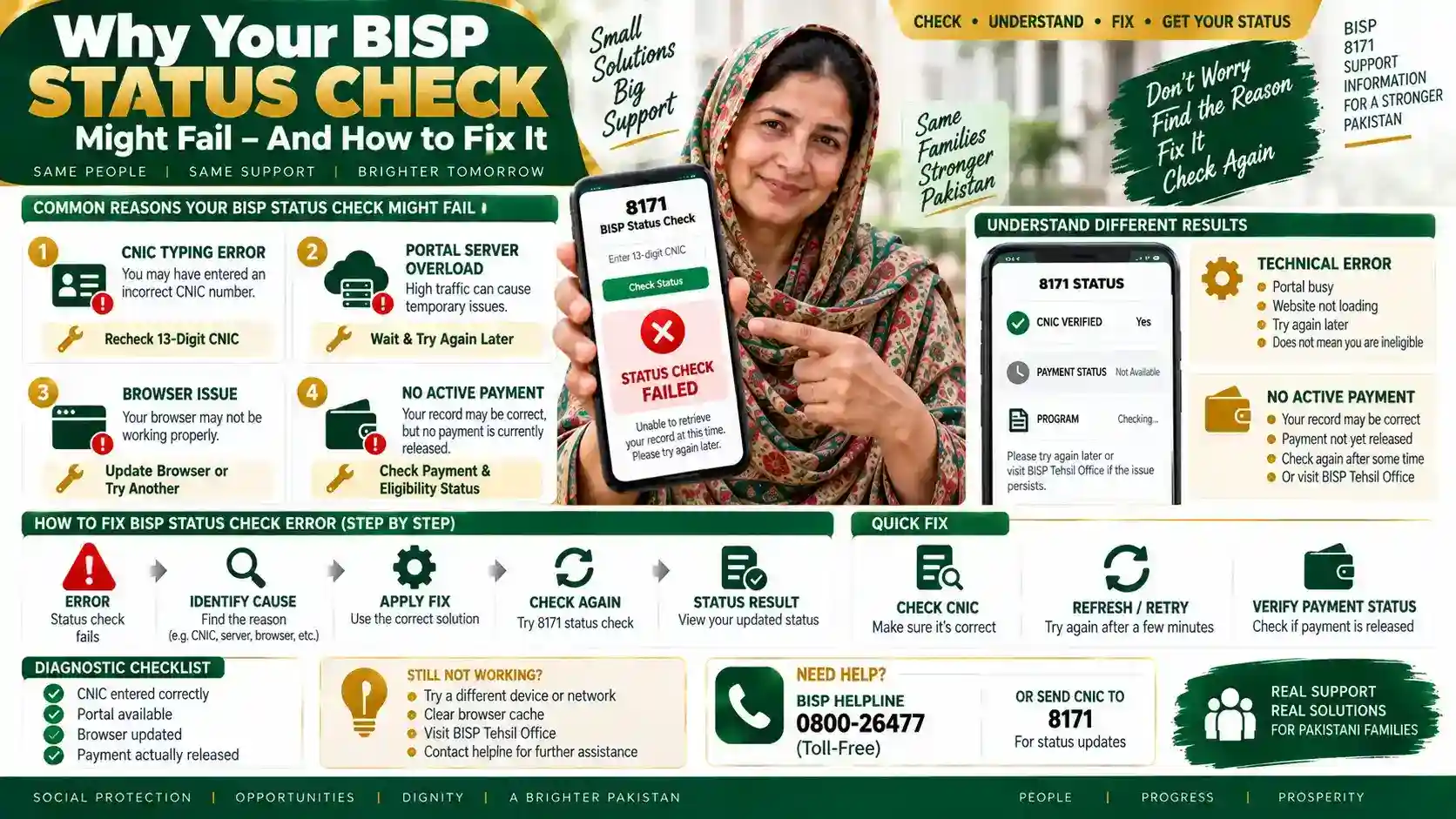
A BISP status check usually fails for one of four reasons: a CNIC typing error, a portal server overload right after a new disbursement is announced, an outdated or incompatible browser, or a record that genuinely has no active payment yet. Three of these four causes have a fix you can try right now, without visiting an office. This guide walks through each cause, how to confirm it applies to you, and what to do if the check still won’t load.
Cause 1: CNIC Entered Incorrectly
The single most common reason a check fails is a mistyped CNIC. The portal reads exactly 13 digits, with no dashes and no spaces.
How to Fix It
- Re-enter your CNIC slowly, digit by digit
- Remove any dashes or spaces before submitting
- Double-check the CNIC belongs to the household head registered with BISP, not a spouse or child
- Retry the check after confirming all 13 digits match your physical CNIC card
Cause 2: Portal Overload After a New Disbursement
Traffic on 8171.bisp.gov.pk spikes sharply whenever a new payment cycle opens, and the server can slow down or time out during these windows. In practice, the portal loads far faster late in the evening, since most beneficiaries check during the daytime rush right after an announcement.
How to Fix It
- Wait 15–20 minutes before retrying if the page times out
- Try checking after 9 PM, when traffic typically drops
- Use the SMS method instead by sending your CNIC to 8171 as a backup
- Avoid refreshing repeatedly, since this adds to the same server load causing the failure
Cause 3: Browser or Connection Issues
Older browser versions and weak mobile data connections can cause the CAPTCHA or result page to fail loading, even when the CNIC is correct and the portal is running normally.
How to Fix It
- Switch to Google Chrome if you’re using a default or outdated phone browser
- Clear the browser cache and reload the page fresh
- Switch from WiFi to mobile data, or vice versa, if one connection is unstable
- Reload the CAPTCHA if it appears blank or distorted before submitting your CNIC
Cause 4: No Active Record for This Cycle
Sometimes the check itself works correctly, but it returns no payment because the CNIC isn’t currently linked to an active disbursement. This isn’t a technical error — it reflects your actual record status.
How to Fix It
- Confirm your household was registered during a BISP survey, not just self-submitted online
- Check whether your PMT re-verification is due, since a pending survey can pause payments
- Visit our 8171 payment status guide to understand what each result label actually means
- Call the helpline if the record shows registered but no payment appears for two consecutive cycles
What If the Check Still Won’t Work
If you’ve tried all four fixes and the portal still fails to load or return a result, the issue is likely on BISP’s server side rather than your device. Call the BISP helpline at 0800-26477, which is free on all networks, and have your CNIC ready. Staff can confirm your record status directly, without needing the portal to load. For a full walkthrough of the check process itself, see our guide to checking your BISP balance and status online, which covers both the web and SMS methods step by step.
FAQs
Why does my BISP CNIC check say “invalid CNIC” even though my CNIC is valid?
This almost always means a dash, space, or extra digit was entered by mistake. Remove all formatting and enter only the 13 digits in sequence. If the error repeats with a confirmed correct CNIC, the record itself may not be linked to BISP yet.
Is it safe to keep retrying the portal if it keeps timing out?
Yes, but space out your attempts by at least 15 minutes during high-traffic periods. Repeated rapid refreshing adds to the same congestion causing the timeout in the first place.
Does a failed check mean I’m not eligible for BISP?
No. A failed check usually means a technical or entry error, not an eligibility decision. Only a completed check that returns a clear “not eligible” or “no record found” result reflects your actual status.
Can I check my status without using the web portal at all?
Yes. Send your 13-digit CNIC as a text message to 8171, and you’ll receive your status by SMS, which works even without internet access.
What should I do if the helpline line is busy?
Try calling again after a short wait, since call volume rises around disbursement announcements just like portal traffic does. You can also retry the SMS method to 8171 in the meantime.
How do I know if the problem is with the portal or with my own connection?
Try the SMS method to 8171 while the portal is failing. If the SMS check works normally, the issue is specific to the web portal, not your BISP record.