
What Do BISP Payment Status Messages Actually Mean?
A BISP payment status message tells you exactly where your payment stands right now — approved, pending, held, or rejected. Each message maps to a specific stage in the system: eligibility confirmed, biometric or SIM verification pending, payment processed, or an issue that needs a fix. The wording can look confusing on first read, especially if you checked expecting a straightforward yes or no. This guide explains what each common message means and what it means for your next payment.
The Main BISP Payment Status Categories
Every result you see after a CNIC check falls into one of a few broad categories. Knowing which bucket your message belongs to makes the rest of the process easier to follow.
“Eligible” or “Approved”
This means your record passed the eligibility check and a payment has been or will be released. It confirms your PMT score and household data are within the qualifying range. It does not always mean the money has reached your wallet yet — timing depends on the disbursement cycle.
“Not Eligible”
This means your current PMT score or household data does not meet the program’s cut-off. It is not always permanent. Household circumstances get reassessed periodically, and a status can change between survey cycles.
“Under Process” or “Under Review”
This means your application or payment record is still being verified. Common causes include a pending biometric match, a recent registration, or a data update still moving through the system. No action is needed unless the status stays unchanged for several weeks.
“Payment Successful” or “Disbursed”
This confirms the amount has already been sent to your registered wallet or bank account. If you have not received the funds despite this message, the SIM Wallet Registration page under Payments covers the exact verification steps to follow.
“Payment Failed” or “SIM Not Verified”
This means the transfer could not go through, usually because the SIM linked to your wallet is not biometrically verified or is inactive. This is the most common reason a confirmed-eligible beneficiary still sees no funds land.
How the 8171 System Decides Your Status
Your status message is not random text — it reflects a chain of checks the system runs automatically. First, your CNIC is matched against NSER household data to confirm eligibility. Next, your PMT score is compared against the program’s threshold for the relevant scheme. Finally, the system checks whether your registered SIM or bank account passes biometric verification before releasing funds. A message like “Not Eligible” or “Payment Failed” usually points to a break at one specific stage in that chain, not a system-wide problem.
In practice, most “Payment Failed” messages trace back to SIM verification rather than eligibility itself, which is why re-checking your wallet registration often resolves the issue faster than assuming you were dropped from the program.
Why Your Status Message Matters for Your Payment
The exact wording changes what you should do next. “Eligible” with no payment yet usually just means you need to wait for the current disbursement window. “Under Process” means the system needs more time, not more paperwork, in most cases. “Not Eligible” or “Payment Failed” are the two messages that call for action rather than patience.
If you have not run the check yet, or want to confirm your current status directly, the 8171 web portal is where you enter your CNIC and see the live result these messages come from. Reading the message correctly only helps once you have the actual result in front of you.
Common Misunderstandings About Status Messages
A few mix-ups come up often enough to address directly.
“Under Process” does not mean rejected. It means the system has not finished verifying your record. Reading it as a rejection leads some beneficiaries to reapply unnecessarily, which can slow the original check down further.
“Not Eligible” does not always mean permanently excluded. Household economic conditions are reassessed, and a PMT score from one survey cycle is not fixed for life.
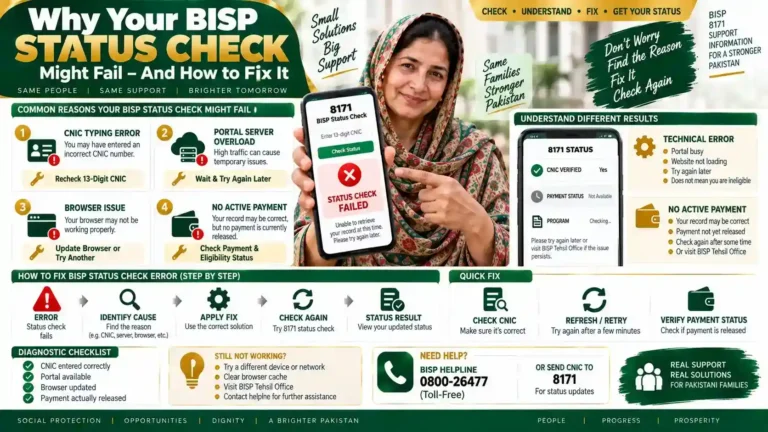
A blank or error screen is not the same as “Not Eligible.” A blank result usually points to a CNIC entry mistake, a network issue, or a temporary portal outage — not a program decision.
What To Do Next Based on Your Message
Match your result to one of the categories above, then act only where action is actually needed. “Eligible” and “Under Process” both mean wait and recheck later. “Not Eligible” is worth confirming again after the next survey update. “Payment Failed” or “SIM Not Verified” needs a wallet check, since this is the one message category that responds to direct action from the beneficiary.
Frequently Asked Questions
What does “Under Process” mean on the BISP portal?
It means your record is still being verified and has not reached a final decision yet. This is common for new registrations or recent data updates. No further action is needed unless the status stays the same for several weeks.
Why does my status say “Eligible” but I haven’t received payment?
Eligibility and disbursement are two separate steps. Being marked eligible confirms you qualify, but the payment still depends on the current disbursement schedule and your wallet’s verification status.
Can a “Not Eligible” status change later?
Yes. Eligibility is based on periodic household survey data, so a status can change when your information is reassessed in a later cycle.
What should I do if my status shows “Payment Failed”?
Check whether your SIM or wallet account is biometrically verified, since this is the most common cause of a failed transfer. An unverified or inactive SIM will block the payment even when eligibility is confirmed.
Does a blank result mean I am not registered?
Not necessarily. A blank or error result often points to a CNIC typo, a temporary portal issue, or a network problem rather than a registration decision.
How often do BISP payment statuses update?
Statuses update as new verification data comes in, which can be daily during active disbursement periods and slower between cycles. Rechecking periodically is the most reliable way to catch a change.
Is there a difference between “Disbursed” and “Payment Successful”?
Both indicate the payment has been sent to your registered account or wallet. Any wording difference usually comes from which disbursement partner processed the transaction, not a different outcome.