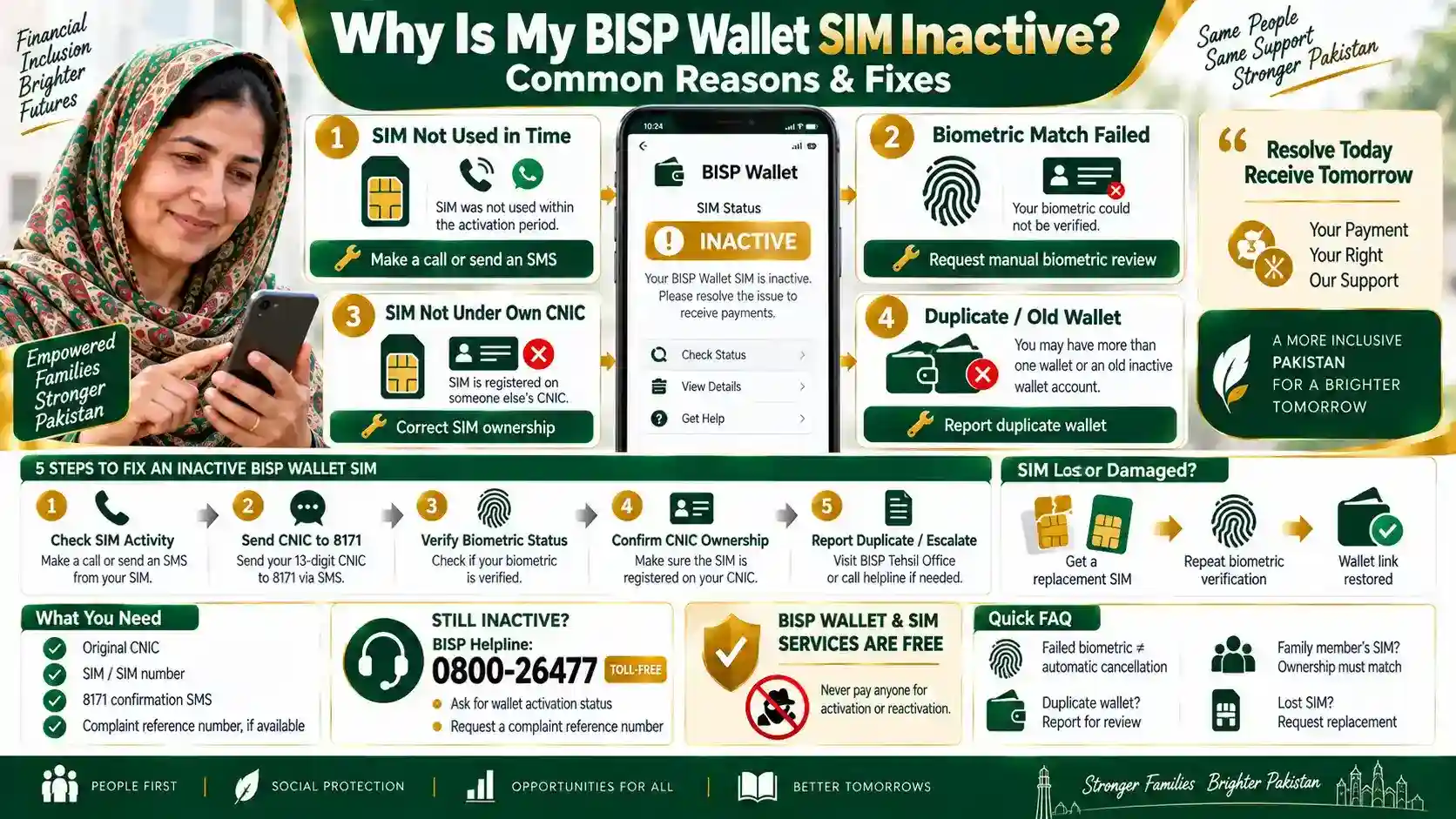
A BISP wallet SIM usually shows inactive for one of four reasons: it wasn’t used within the operator’s activation window, the biometric verification didn’t fully match, the SIM isn’t registered under your own CNIC, or a duplicate wallet already exists on that number. Each cause has a specific fix, and most don’t require a fresh SIM. This guide walks through all four so you can confirm which one applies to you.
Why BISP Wallet SIMs Show Inactive
The SIM Wasn’t Used in Time
Telecom operators deactivate a new SIM if it doesn’t register a call or SMS within a set window after issue. A BISP wallet SIM that sits unused in a drawer can show inactive even though the wallet itself was set up correctly at registration.
Biometric Verification Didn’t Fully Match
Your fingerprint scan at registration may not have matched your NADRA record closely enough to confirm. This is common among elderly beneficiaries or anyone with worn or faded fingerprints, and it doesn’t mean the registration failed permanently — it usually just needs a manual review.
The SIM Isn’t Registered Under Your Own CNIC
BISP wallet SIMs must be registered under the beneficiary’s own CNIC. If the SIM was issued under a family member’s ID, or ownership details don’t match BISP’s record, the wallet can’t activate correctly.
A Duplicate or Old Wallet Exists on the Number
If the SIM previously had an Easypaisa, JazzCash, or similar wallet linked to it, the system may block a new BISP wallet from activating on the same number until the old one is closed.
How to Fix an Inactive Wallet SIM
Work through these in order:
- Make a call or send an SMS from the SIM first. This alone resolves the issue if inactivity was the only cause.
- Send your 13-digit CNIC to 8171 to check your current wallet and SIM status.
- Visit your nearest BISP Tehsil Office with your original CNIC if the status shows a biometric hold.
- Request a Biometric Override if repeated fingerprint attempts fail — this is a standard BISP procedure and doesn’t affect your eligibility.
- Ask the office to confirm SIM ownership matches your CNIC, and correct it on the spot if it doesn’t.
- Report a duplicate wallet to the agent or Tehsil Office so the old account can be closed before your BISP wallet is linked.
In practice, most inactive-SIM cases trace back to the SIM simply not being used in time, which is why making one call before visiting an office often solves it without any paperwork.
If Your SIM Was Lost or Damaged
A lost or damaged SIM doesn’t close your wallet record. Visit the Tehsil Office with your original CNIC and request a replacement on the same network. Your existing wallet linkage transfers to the new SIM once biometric verification is repeated. Report the loss promptly, since leaving a replacement SIM unused can trigger the same inactivity issue described above.
What If It’s Still Not Working
If you’ve made a call, confirmed your CNIC match, and completed biometric verification but the wallet still shows inactive, the issue likely needs a manual case review. Ask the Tehsil Office to log a formal complaint with your CNIC and SIM number attached, rather than repeating the same verification steps.
Where to Escalate
- Call the BISP helpline: 0800-26477 (toll-free, all networks)
- Ask specifically for your wallet’s activation status, not just a general payment update
- Request a complaint reference number if the issue can’t be resolved on the call
SIM and wallet registration is always free. Never pay anyone to activate or reactivate your BISP wallet SIM.
For the wider picture of how the SIM wallet fits into your payments, the BISP wallet account guide covers registration and status checks in more detail.
Frequently Asked Questions
How long can a BISP wallet SIM stay unused before it deactivates?
It varies by telecom operator, but most deactivate a SIM that records no call or SMS activity within a set window after issue. Making one call or sending one SMS from the SIM keeps it active.
Does a failed biometric scan mean I lose my BISP registration?
No. A failed fingerprint match at registration doesn’t cancel your eligibility. Staff can request a manual Biometric Override, which is a standard part of the process.
Can I use a family member’s SIM for my BISP wallet?
No. The SIM must be registered under your own CNIC. If it’s registered under someone else’s ID, visit a telecom franchise to correct ownership before your BISP wallet can activate.
What if a duplicate wallet is blocking my activation?
Report it to your Tehsil Office or agent. They can help close the old wallet linked to your SIM so your BISP wallet can be set up cleanly on the same number.
Does BISP charge any fee for SIM or wallet activation?
No. SIM issuance, wallet linking, and biometric verification are all free BISP services. If anyone asks for payment, report it to the helpline at 0800-26477.
What if my SIM is lost — do I need to re-register from scratch?
No. Visit the Tehsil Office with your original CNIC and request a replacement SIM on the same network. Your wallet linkage carries over once biometric verification is repeated.
Who do I contact if none of these fixes work?
Call 0800-26477 and ask for a written complaint number covering your wallet activation issue specifically. Keep your CNIC and any confirmation SMS from 8171 on hand for follow-up.